

Selecting a vendor to support time tracking for your construction business is one of the most important decisions a construction company can make. Your payroll, job costing, and compliance responsibilities hinge on having the most accurate data that only a digital time tracking solution can provide. Choose the wrong solution, and already burdened staff will be chasing down timesheets and manually entering data. The right solution frees up your time for important tasks while offering features that provide valuable insights into your operation, helping you stay aligned, competitive, and compliant.
This article is part one of a three-part series that reviews 10 of the most widely used construction time tracking solutions, including Arcoro Time (formerly ExakTime), to help you understand what each tool does well, where it has limits, and who it's built for. The information comes from product documentation, user reviews, and publicly available information to give you a straightforward comparison.
1. Arcoro Time (formerly ExakTime)
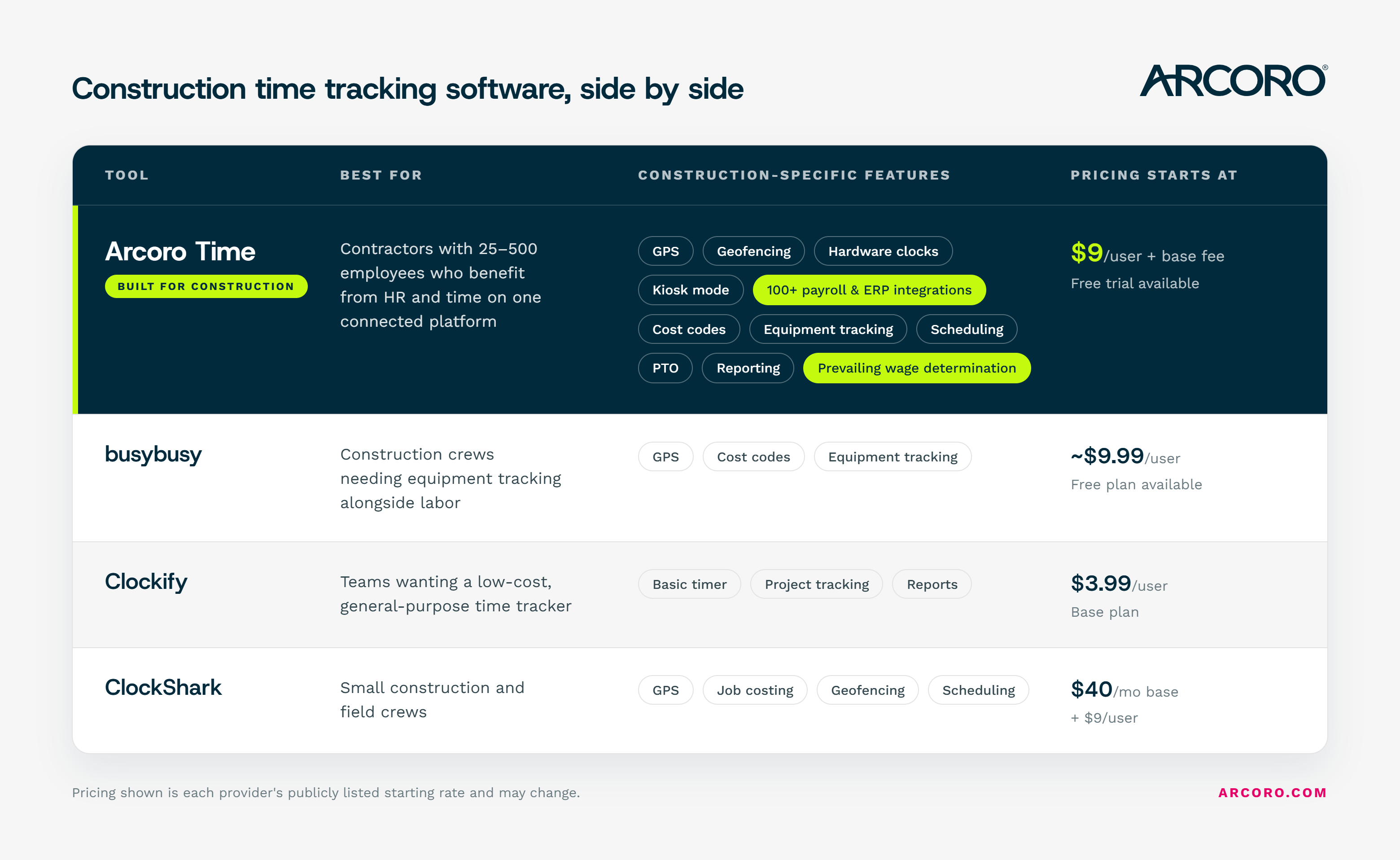
Best for: Construction companies with 25-500 employees that benefit from the efficiencies of time tracking connected to broader HR, payroll, and compliance workflows
Arcoro Time is purpose-built for construction, with a history dating back to rugged jobsite hardware and a current platform that includes more construction-specific features than any other solution on the list. It offers mobile clock-in, GPS tracking, geofencing, and integrations with more than 100 payroll and accounting systems, including QuickBooks, Sage, Foundation, Acumatica, Procore, and Viewpoint. It works in environments where other apps struggle, including remote sites with limited connectivity.
What sets Arcoro Time apart from general-purpose tools is that it sits within the broader Arcoro platform. If your company also needs HR, benefits management, or ACA compliance, Arcoro Time is designed to share data across those functions rather than operate as a standalone clock-in app.
Key features:
- Mobile clock-in via unified app, PIN, or jobsite kiosk hardware
- GPS tracking and geofencing for jobsite verification
- Cost code assignment at clock-in
- Offline mode with automatic sync
- Supervisor-led crew clock-in options
- Timesheet review and approval workflows
- Integrations with 100+ payroll and ERP systems, including: QuickBooks, Sage, Foundation, Acumatica, Procore, and Viewpoint
- Bilingual (English and Spanish) interface support
- FaceFront photo ID capture
- Multi-media field notes
- Equipment and expense tracking, including photo attachments for receipts and site documentation
- Scheduling to manage crews and job sites
- Time off tracking and PTO administration, including group requests and hire-date-based balance resets
- Custom alerts and notifications
- Compliance features like prevailing wage determinations, certified payroll, and meal and break tracking
What users appreciate: The many upgrades Arcoro is making to the product and mobile app. The flexibility of clock-in methods, particularly the physical kiosk hardware option for crews who share devices or work in areas with poor cell service. Integration depth with construction accounting systems is also frequently cited. The award-winning customer service that provides continual live and online support.
Considerations: Arcoro Time is built for construction companies, so if your business spans multiple industries or you're looking for a lightweight general-purpose tracker, it may include more than you need.
“My company uses Arcoro Time (formerly ExakTime) for accurate employee time reporting per job, and the report feature makes it incredibly easy to calculate our labor expenses and determine how much money each job earned. For even more in-depth reporting, we've been able to work with the Advanced Analytics team to create custom reports that will save us roughly three hours of labor per week.”
Pricing: Arcoro Time starts at $9 per user and goes up to $19 with the addition of Arcoro Payroll. There is also a 14-day free trial.
The Takeaway: Arcoro Time is great for mid-sized construction companies that need all the features unique to the industry, like tracking time for a mobile workforce, adhering to compliance requirements, and job costing data. Its robust reporting and analytics tools provide a clear picture for job costing.
2. BusyBusy (now under AlignOps)
Best for: Construction companies that want to track labor and equipment time in one place
BusyBusy is a GPS time tracking platform built for construction and field service crews. It was acquired by Align Technologies (formerly ToolWatch) and now operates under the AlignOps umbrella, though the product, pricing, and support remain unchanged. What distinguishes BusyBusy from some non-construction specific solutions on this list is its equipment tracking capability alongside labor hours, giving managers a unified view of both crew time and machine utilization.
The platform has a free tier with core tracking features and paid tiers that unlock geofencing and advanced reporting.
Key features:
- GPS time tracking with geofencing (paid plans)
- Supervisor and individual clock-in options
- Kiosk mode with photo verification
- Equipment tracking
- Cost codes
- Daily reports, photos, and progress tracking
- Offline mode with automatic sync
- Integration with QuickBooks, Sage, and other payroll systems
What users appreciate: Ease of use is the most consistent theme across reviews from G2. The combination of labor and equipment tracking in one platform is a genuine differentiator for contractors managing heavy equipment alongside their crews.
Considerations: The free plan does not enforce geofenced clock-in. Some users note that uploaded photos are often low-resolution. The platform is best suited for field execution rather than full project management or certified payroll compliance.
“It's super easy for the guys to clock in and out from their phones, and I love the GPS tracking feature. The free version lacks many of the features of the pro version.”
Pricing: Free plan available. Pro and Premium tiers available; paid pricing starts at approximately $9.99/user/month plus a $40 admin fee.
The Takeaway: The free plan doesn’t offer any of the features contractors need to accurately track workers and costs, so most will have to use a paid tier. Certified payroll compliance isn’t native to the solution.
3. Clockify
Best for: Teams that need a simple, low-cost way to log hours across projects without construction-specific requirements
Clockify is a general-purpose time tracker that includes a free tier. Made for multiple industries, it covers timer-based tracking, manual time entry, project organization, and basic reporting. For construction, it can handle basic job logging by project and task, though it is not designed around construction workflows.
Key features:
- Timer-based and manual time entry
- Project and task organization
- Weekly timesheet view
- Basic reporting by project, user, and client
- Payroll integrations
- Kiosk mode for shared device clock-in
What users appreciate: The basic plan covers a lot of ground for small teams, and the setup is minimal. Organizations that need simple hour logging across a distributed team without deep construction features find it easy to deploy.
Considerations: Clockify does not include GPS tracking, geofencing, offline mode, cost code structures, or certified payroll support in its standard offering. It is not designed for field crews working across multiple job sites and should be evaluated as a basic time logging tool rather than a construction-specific solution. Advanced features, including time auditing, custom fields, and stronger security, require paid plans.
“It's simple and free, offers the basic features. But it doesn't have payroll or other HR services, so it's not really suitable for larger organizations.”
Pricing: Plans start at $3.99/user/month billed annually (Basic).
The Takeaway: While affordable, there’s a serious lack of construction-specific features most contractors demand from a time tracking solution.
4. ClockShark
Best for: Small construction and field service companies with less than 25 employees needing straightforward GPS time tracking and scheduling
ClockShark is a cloud-based platform built for multiple field service businesses including healthcare and real estate management. It handles time tracking, GPS verification, scheduling, and job management, and connects to payroll platforms including QuickBooks and Gusto.
The platform includes basic time tracking features. Crews can clock in via mobile app, desktop, or kiosk mode, and managers see who's on site and what job they're clocked into. Job costing features are available, including the ability to generate reports for payroll and billing.
Key features:
- Mobile clock-in and kiosk mode
- GPS tracking and geofencing for location verification
- Scheduling
- Cost codes
- QuickBooks, Gusto, and ADP payroll integrations
- Break and PTO tracking (Pro plan)
What users appreciate: The setup is quick, and the learning curve is low. Field employees generally adopt it without friction, and the scheduling interface is particularly well-reviewed.
Considerations: Some users report GPS inaccuracies and mobile app sync issues. Advanced job costing and PTO tracking are gated behind the Pro tier. For teams with certified payroll requirements or complex compliance needs, ClockShark may need to be paired with additional tools. The pricing structure includes a base fee plus per-user charges, which can add up for larger crews.
“I like being able to easily track which employees are on which job. Reporting is a little clunky at times; also editing time clock entries could be streamlined a bit more. GPS tracking isn't super accurate at times.”
Pricing: Standard: $40/month base + $9/user/month. Pro: $60/month base + $11/user/month. 14-day free trial available.
The Takeaway: Quick set up and easy-to-use, but key features cost more, and a lack of support makes fixing the buggy software an issue.
The Bottom Line in Choosing Time Tracking Tools for Construction Firms
Choosing the right construction time tracking solution depends on your company’s unique needs, whether that is complying with payroll regulations, using it to track job costs, and getting your employees to use it regularly.
Here are some factors to consider:
- Your primary pain point. If buddy punching and payroll inflation are the main problem, a having a GPS-enforced app with safeguards, like biometrics and geofencing, may be the right starting point. If integrating with your ERP is the bigger challenge, your chosen solution needs to integrate with your existing software to reduce friction on your office teams.
- Crew size and structure. Some solutions only work well for smaller crews. Platforms with dedicated hardware or enterprise integrations like Arcoro Time are more suited to companies managing 25 or more workers across multiple sites.
- Connectivity in the field. If your crews regularly work in areas without reliable cell service, offline mode is not optional. A solution that offers offline functionality is a must.
- Compliance requirements. Certified payroll, Davis-Bacon, and prevailing wage compliance require tools that can support multiple pay classifications, generate WH-347 reports, and maintain audit trails. Not all tools on this list handle those workflows. Evaluate this carefully before committing.
- Whether you need time tracking alone or alongside HR. If time tracking is one piece of a broader HR challenge that includes onboarding, benefits, performance, and compliance, a platform like Arcoro that connects all functions may deliver more value than a standalone clock-in app.
Arcoro built its time tracking solution specifically for the construction industry. We’ve been doing this since 1999, and we understand the unique challenges contractors face daily. Plus, our award-winning customer service team has your back before, during, and after the implementation process.
Start your 14-day free trial today.

This comparison was compiled using publicly available product information, user reviews from Capterra and G2, and vendor documentation current as of 2025 and 2026. Pricing is subject to change; verify directly with each vendor before making a purchasing decision.