
Keep Your People, Time, and Payroll in Sync with Arcoro + Sage Intacct
Arcoro Time (formerly ExakTime) and Arcoro Payroll both connect directly to Sage Intacct, so your employees, jobs, and cost codes stay current everywhere, and the hours your crews log flow automatically into payroll and job costing. No double entry, no manual reconciliation.
Why Connect Arcoro to Sage Intacct
One Accurate Source of Data, Everywhere
Set up employees, jobs, cost codes, and locations once in Sage Intacct, and that same data flows automatically into whichever Arcoro solution you use: Arcoro Time, Arcoro Payroll, or both. Your teams stop re-entering the same information in multiple systems.
From the Jobsite to the Books, Automatically
Approved hours move from the field into Sage Intacct as clean, review-ready timesheets or GL journal entries, already matched to the right employee, job, and cost code. Your payroll and accounting teams pick up where the data left off, instead of starting over.
Real-Time Visibility Into Labor Costs
With workforce and financial data in sync, leadership and project managers get an accurate, real-time view of labor costs by job, cost code, and location. Better data means better decisions, from bidding the next job to planning your workforce.
Arcoro Payroll + Sage Intacct Overview
Arcoro Payroll handles the parts of construction payroll that generic systems cannot: multi-state taxes, prevailing wage, and certified payroll. Once payroll runs, the results sync back to Sage Intacct as clean, reviewable GL journal entries, so your accounting team validates and posts, instead of re-keying.
Best for: Companies who want Arcoro to run payroll and hand accounting teams a ready-to-post entry in Sage Intacct.
Arcoro Time + Sage Intacct Overview
Arcoro Time captures accurate hours in the field, GPS-verified and matched to the right job and cost code as crews clock in. Approved hours flow into Sage Intacct as draft timesheets, ready for your payroll team, whether that is Arcoro Payroll or another provider.
Best for: Companies who want accurate, job-costed time data in Sage Intacct Construction, no matter who runs payroll.
Arcoro Payroll + Sage Intacct: How Data Flows
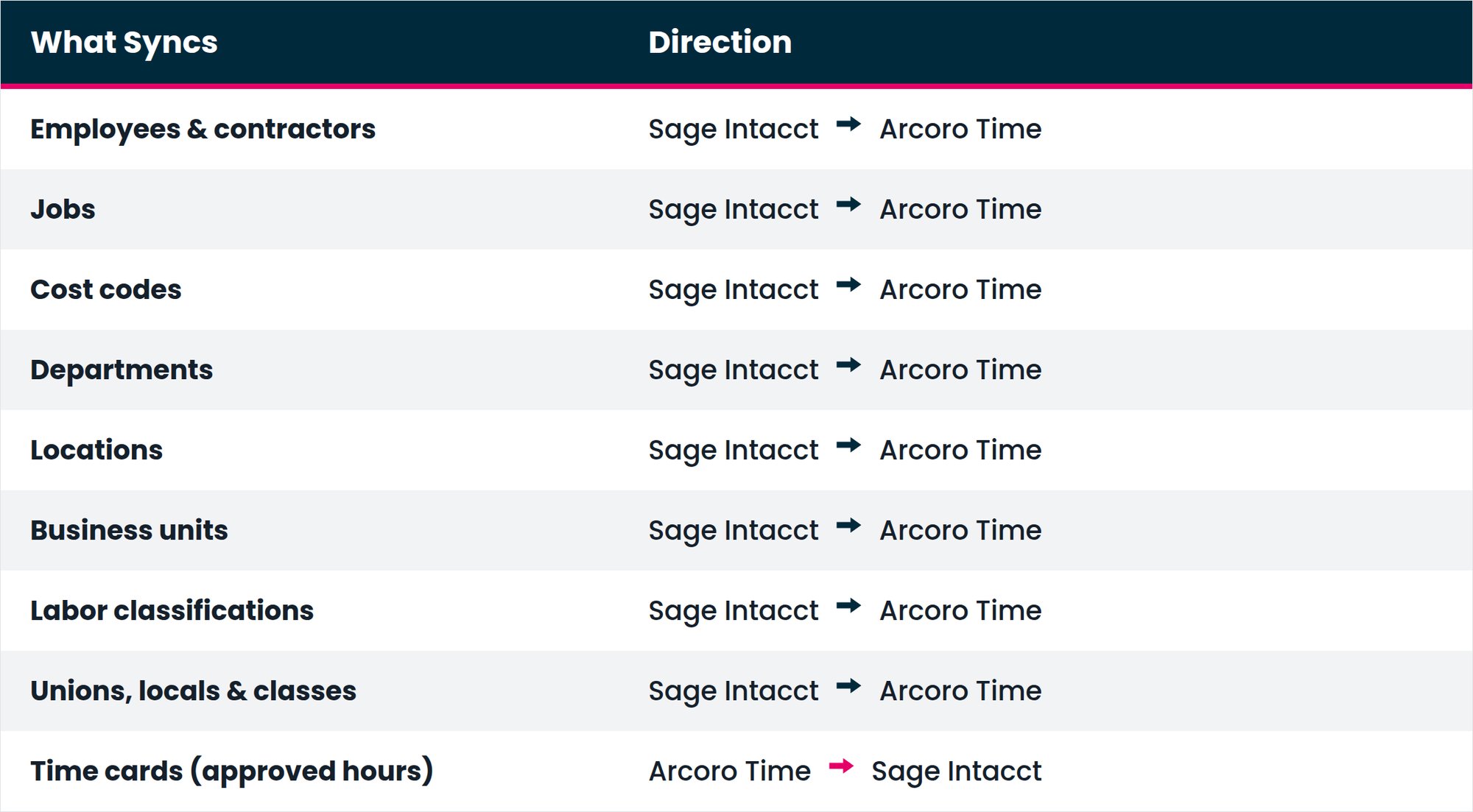
The integration runs in two directions over a two-way API connection. Company-level data, employees, departments, jobs, cost codes, locations, and labor and union details, flows from Sage Intacct Construction into Arcoro.
In the other direction, completed payroll (GL journal entries, timecards, and employee payroll updates) flows from Arcoro Payroll back into Sage Intacct Construction, ready for your accounting team to review and post.
Arcoro Time + Sage Intacct: How Data Flows
The integration runs in two directions. First, your people and job data flow from Sage Intacct Construction into Arcoro Time, so crews are always working against current employees, projects, and cost codes.
Then, approved hours flow back from Arcoro Time into Sage Intacct Construction as draft timesheets, already matched to the right employee, job, and cost code, ready for your payroll team to review and post.
Arcoro Time + Sage Intacct: How Data Flows
The integration runs in two directions. First, your people and job data flow from Sage Intacct Construction into Arcoro Time, so crews are always working against current employees, projects, and cost codes.
Then, approved hours flow back from Arcoro Time into Sage Intacct Construction as draft timesheets, already matched to the right employee, job, and cost code, ready for your payroll team to review and post.
What construction companies like yours are saying
Arcoro connects to Sage Intacct through a two-way sync. Company data, employees, jobs, cost codes, departments, locations, labor classifications, and union details, flows from Sage Intacct into Arcoro first. From there, if you use Arcoro Time, approved hours flow back as draft timesheets, matched to the right employee, job, and cost code. If you use Arcoro Payroll, completed payroll flows back as GL journal entries, timecards, and employee payroll updates, ready to review and post.
Arcoro Time is purpose-built for construction, so it already understands the jobs, cost codes, locations, and union rules your Sage Intacct company runs on, and keeps them in sync automatically. Hours come back as draft timesheets already matched to the right employee, job, and cost code, cutting out manual exports and re-entry.
Because the integration works with whatever payroll process you already use, you get accurate, job-costed time data in Sage Intacct whether or not you run Arcoro Payroll.
See the field reference tables in Sections 4 and 5 above. In short: employees, contractors, jobs, cost codes, departments, locations, business units, labor classifications, and union information sync from Sage Intacct into Arcoro. Depending on which Arcoro solutions you use, approved hours (Arcoro Time) and completed payroll transactions (Arcoro Payroll) sync back.
Creating a Seamless Employee Benefits Experience with Arcoro and Sage

Enhanced Field Oversight with ExakTime: Custom Messages Keep Workers Updated